
Your app looks perfect in English. Then it ships in German and every button overflows its container. It ships in Arabic and the layout doesn’t just need new text — it needs to run in the opposite direction entirely. It ships in Japanese and half your date fields are formatted wrong. This software localization checklist exists because breakages like these are common, and mostly preventable, once you know where to look before translation starts.
None of this happens because the translation was bad. It happens because software localization is a design problem first and a translation problem second. Most teams only discover that order after launch, when fixing it costs far more than planning for it would have.
Why Software Localization Breaks More Often Than You’d Think
Translating a website or a marketing document is largely a content problem: swap the words, keep the meaning, adjust the tone. Software is different. The words live inside a system with fixed constraints — button widths, character limits, hardcoded formatting, layout direction — and teams usually built every one of those constraints around English by default.
German and Finnish words run 20–35% longer than their English equivalents on average. A “Save” button that fits comfortably at 60 pixels wide in English becomes “Speichern” in German — nearly double the character count. The button then wraps to two lines, gets visually clipped, or pushes everything next to it out of alignment. Thai and Chinese pack more meaning into fewer characters, which can make buttons look sparse and empty instead of overflowing. Arabic and Hebrew don’t just need new characters — they need the entire interface mirrored. A translator can’t fix any of this alone once the text already sits inside the software. Teams have to plan for it before translation even starts.
That’s what the rest of this guide covers: the checkpoints that catch these issues early, organized by where they typically show up — in the code, in the design, in QA, and in a few places most teams don’t think to look until something’s already broken.
Software Localization Checklist, Part 1: String Externalization
This is the step that determines whether everything downstream goes smoothly or badly. “Externalizing strings” means pulling every piece of user-facing text out of the code and into a separate, translatable resource file — instead of leaving text hardcoded inline. The W3C’s Internationalization Activity treats this separation as the foundational step any localization-ready product needs before translation work can begin at all.
{userName} represents and where it can safely move within a sentence.Software Localization Checklist, Part 2: UI and Design
Even with clean strings, the interface itself needs to flex to accommodate them. This is where design and localization intersect most directly.
Four Mistakes That Show Up in Almost Every First Localization Pass
Even teams working carefully through this software localization checklist tend to trip on a handful of the same issues the first time around:
- Translating error messages last, or not at all. They’re often the least glamorous strings in the app, so teams push them to the bottom of the list. But an untranslated error message at the exact moment something goes wrong is one of the most jarring experiences a user can have.
- Assuming one language equals one locale. Spanish in Spain, Mexico, and Argentina share a language but differ in currency formatting, date conventions, and sometimes vocabulary. Treating “Spanish” as a single bucket usually surfaces as a support complaint later, not a QA bug earlier.
- Testing translations in a spreadsheet instead of the live interface. A string can read perfectly in isolation and still overflow, truncate, or misalign once it’s actually sitting inside a button or a nav bar.
- Locking the UI design before localization is considered. Once a design earns final approval and moves to engineering, there’s often no appetite left to revisit spacing or button widths for languages that weren’t part of the original design review.
Right-to-Left Languages: What Actually Changes
Arabic, Hebrew, Urdu, and several other languages read right to left — and that’s not a translation detail, it’s a full interface mirroring exercise. Text alignment flips. Navigation menus that open from the left now open from the right. Designers also need to mirror icons implying direction — back arrows, forward arrows, progress bars — or they’ll point the wrong way relative to the reading direction.
It gets more nuanced than a simple mirror image, though. Numbers inside RTL text are usually still written left to right — a phone number embedded in an Arabic sentence doesn’t reverse its digit order. Logos and brand marks typically don’t mirror either. Some UI elements, like a media player’s play/pause controls, stay left-to-right by convention even inside an otherwise RTL layout. Reversing them actually confuses users more than it helps.
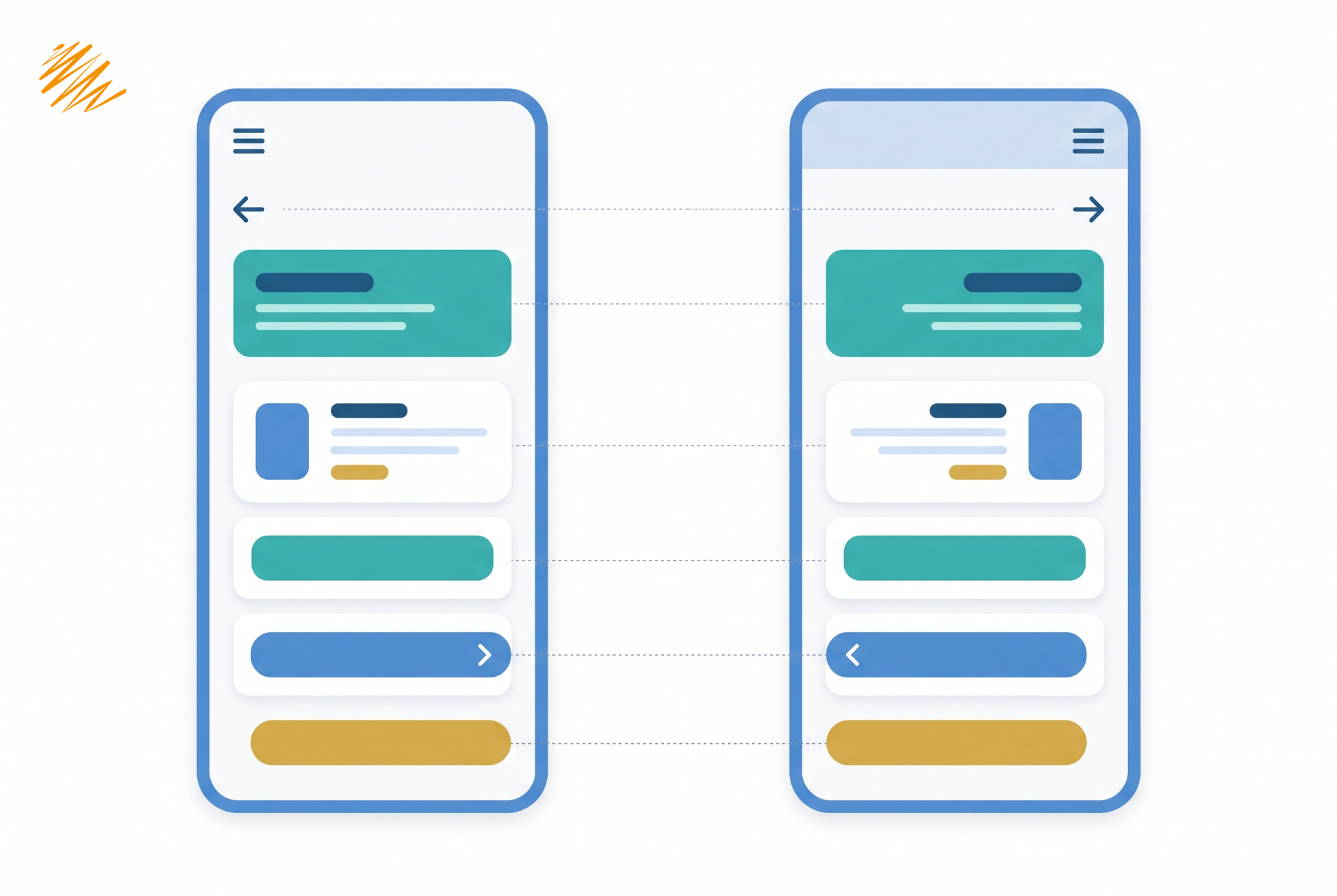
The practical takeaway: if RTL support is on your roadmap at all, build the interface using logical layout properties — start/end instead of left/right — from the beginning. Retrofitting a left-to-right codebase later is almost always slower and buggier than designing for it from day one.
Software Localization Checklist, Part 3: QA and Testing
Building Localization Into the Development Workflow
Teams that handle this well treat localization as a continuous part of development, not a phase that happens after a feature is “done.” A linting rule blocks any hardcoded text string from merging, so new strings get externalized the moment developers write them. A translation management system (TMS) syncs directly with the codebase through the same CI/CD pipeline used for everything else. New text flows to translators the moment developers commit it, without a manual export-import cycle each release.
Translation memory plays a bigger role here than most teams expect. Translate a string once, and a well-configured TMS reuses that exact translation anywhere the same string appears again — across features, across app versions, even across other products in the same company. That saves teams from paying to translate “Cancel” or “Are you sure you want to delete this?” for the tenth time. Pseudo-localization runs as part of routine testing, the same way unit tests do, catching layout problems the moment a string changes rather than months later during a release push.
The upfront investment is real — the pattern above takes more planning than shipping in one language and figuring out the rest later. The alternative costs more, though. Retrofitting flexible layouts, restructuring hardcoded strings, and re-testing an entire interface after launch is consistently slower and more expensive than building it right the first time. Teams that wait until stakeholders request a second or third language before thinking about any of this usually end up redoing work they thought was already finished.
Not sure how localization-ready your codebase actually is?
We can walk through your app or platform and flag what needs to change before translation starts.
Get a Localization Readiness Check