

By the Translationary Editorial Team | 5 Min Read | Category: [Digital Accessibility / Document Remediation]
You may have published a polished quarterly report, an employee handbook, a product manual, or a client-facing brochure. Visually, it looks complete. But if that PDF or Word file cannot be properly interpreted by a screen reader, navigated by keyboard, or understood by assistive technology, then it is not truly accessible.
In that case, the document may look finished to some users while remaining functionally unusable to others.
At Translationary, we know that translation alone is not enough. If a document is linguistically accurate but digitally inaccessible, the message still does not fully reach its audience. Accessibility and language access often need to work together.
This matters at scale. The World Health Organization estimates that 1.3 billion people, about 16% of the global population, experience significant disability.
Key Takeaways
- such as Section 508, the ADA, and applicable European accessibility requirements.
- Poorly structured tables, forms, and reading order can cause critical information to be misunderstood by screen reader users.
- Accessibility improvements can also support clarity, usability, and discoverability.
- Translation and reformatting often disrupt document accessibility unless the localized file is reviewed and remediated again.
Why Document Accessibility Is Often Overlooked
When organizations think about digital accessibility, they often focus first on websites and mobile apps. Documents are frequently treated as secondary assets. In practice, however, PDFs, Word files, spreadsheets, and slide decks often contain some of the most important information an organization shares, including policies, contracts, reports, manuals, forms, and public-facing resources.
If those documents are inaccessible, the consequences can be just as serious as an inaccessible website.
4 Hidden Risks of Inaccessible Documents
1. Compliance Exposure
Document accessibility is not just a formatting preference. In many contexts, it is part of an organization’s broader accessibility obligations.
For U.S. federal agencies and many contractors, Section 508 applies to electronic and information and communication technology, including electronic documents, and the revised standards generally reference WCAG 2.0 Level AA. Separately, the U.S. Department of Justice’s 2024 Title II web rule requires state and local governments’ web content and mobile apps to meet WCAG 2.1 Level AA on a compliance timeline that begins in April 2026 or April 2027 depending on entity size. In the European Union, the European Accessibility Act began applying on June 28, 2025 to covered products and services.
Many organizations focus heavily on website compliance while overlooking downloadable files. That gap can become a serious problem when important content is delivered through PDFs, Word documents, presentations, or forms.
2. Misinterpretation of Critical Information
This is one of the most important and least discussed risks.
When a document contains a data table, form, chart, or multi-column layout without proper accessibility structure, assistive technologies may not communicate the content in the intended order. A screen reader may fail to associate data cells with the correct headers, may read content out of sequence, or may skip unlabeled elements entirely.
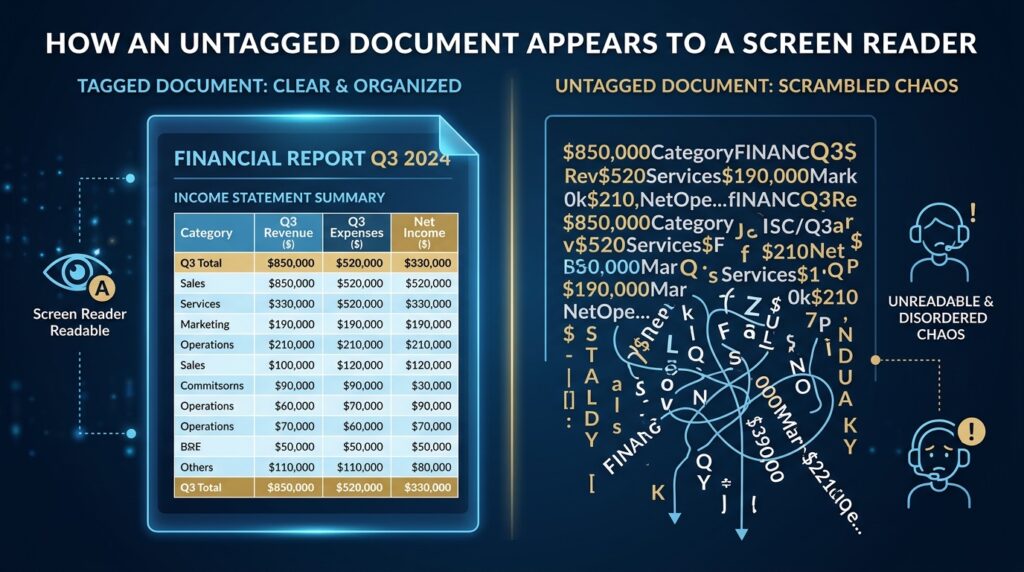
In practical terms, this can affect financial tables, dosage or healthcare instructions, safety procedures, legal notices, HR materials, and other business-critical content. In these situations, poor accessibility is not just an inconvenience. It can lead to misunderstanding, confusion, and prevent users from accessing critical information independently.
3. Reduced Discoverability and Poor Document Structure
Search engines can index digital documents, including PDFs. But structure matters.
Accessibility remediation often supports technical SEO by improving crawlability, structure, image context, and content clarity. While accessibility alone does not guarantee higher rankings, it can strengthen the technical foundation that search engines rely on to understand and index content. Google’s own guidance connects accessible, crawlable site features with better machine understanding of content and navigation.
Inaccessible documents are frequently also poorly structured documents. That means the same issues that make them difficult for users with disabilities can also make them harder for search systems to interpret.
4. Brand Damage and Loss of Trust
An inaccessible document sends a message, even when that message is unintended.
When users cannot independently read, navigate, or understand the content you provide, it suggests that accessibility was not built into the communication process. Over time, that can affect how customers, employees, partners, and stakeholders perceive your organization.
Accessibility is closely tied to usability, professionalism, and inclusion. Organizations that overlook it may not only create barriers, but also weaken trust.
Visual Presentation vs. True Accessibility
One of the most common misconceptions is that a clean-looking document must also be an accessible one. In reality, accessibility depends not only on appearance, but also on how the content is structured behind the scenes.
| Feature | Standard Visual PDF | Remediated Accessible PDF |
| Reading Order | Follows only the visual layout on the page | Uses a logical tag structure that screen readers can follow |
| Headings and Structure | May look organized visually but lack proper heading tags | Includes properly tagged headings, lists, paragraphs, and sections |
| Images and Charts | May appear clearly to sighted users but provide no equivalent information to screen readers | Includes alt text or other appropriate text alternatives where needed |
| Tables | May not identify header rows, columns, or cell relationships correctly | Uses accessible table structure so headers and data are associated properly |
| Color Use | May rely on color alone to communicate meaning | Uses text, labels, or symbols in addition to color |
| Forms | Fields may be unlabeled or difficult to navigate by keyboard | Fields are labeled and support keyboard and screen reader access |
| Language Identification | May not specify the document language correctly | Includes proper language settings for accurate screen reader pronunciation |
Why Accessibility Becomes More Complex After Translation
This is where many organizations run into trouble.
A document may be fully accessible in English, but once it is translated and reformatted, that accessibility structure can be disrupted. Reading order may change. Tagging may be broken. Language settings may be incorrect. Tables and forms may no longer behave as intended with assistive technologies.
This is especially common in multilingual workflows involving right-to-left languages, font substitution, layout expansion or contraction, localized tables and forms, and re-exported PDFs after design changes.
In other words, accessibility does not always survive translation automatically.
At Translationary, we understand that document accessibility and localization must be handled together. A translated file should not only be linguistically accurate. It should also remain usable and accessible in the target language.
Frequently Asked Questions
Can I rely on auto-tagging tools alone?
Auto-tagging can be a useful starting point, but it is rarely enough on its own. Complex layouts, tables, charts, forms, decorative elements, reading order, and language settings often require manual review and correction.
Which file types may need accessibility remediation?
Any digital document intended for distribution may need accessibility review. This can include PDFs, Microsoft Word files, Excel spreadsheets, PowerPoint presentations, training materials, forms, and other downloadable resources.
If my website is accessible, do my documents still matter?
Yes. Documents are often where organizations publish critical information such as policies, reports, manuals, disclosures, and forms. If those files are inaccessible, users may still face major barriers even if the website itself is well designed.
Make Your Documents Work for Everyone
Documents are often the backbone of business communication. Whether you are sharing a report, policy, manual, form, presentation, or multilingual resource, accessibility should be part of the final deliverable, not an afterthought.
At Translationary, we help organizations improve document accessibility across languages, formats, and audiences. From PDF remediation to multilingual document workflows, we support clients who need their files to be both understandable and usable in real-world conditions.
Ready to improve the accessibility of your documents? Contact Translationary to discuss your document remediation needs.